Why can't my member see our classes or book in the TeamBuildr app?
 Updated
Why can't my member see our classes or book in the TeamBuildr app?
Your members can see your OS classes in the TeamBuildr Training app only after their OS profile is matched to their athlete profile in TeamBuildr Strength. If a member can't see your schedule or book, the match is almost always missing or outdated.
How matching works
- An OS member is matched to a Strength athlete with the same email address. Capital letters and extra spaces don't matter.
- Matching runs when you click Update matches in the TeamBuildr OS hub inside your Strength account. Adding a member in OS doesn't match them automatically.
- Only members can be matched. Staff profiles, and Strength athletes with no email address, are never matched.
- Once two profiles are matched, the link stays in place. Changing the member's email in OS afterward does not break it.
Troubleshooting Steps
Check the status of your members profile matching
- Check profile set up: Start by checking that the person exists in both OS and Strength with the same email address.
- If the email addresses do not match, edit either the OS or Strength email so that they are the same across both accounts.
- Navigate to TeamBuildr OS Hub: If the emails do match, navigate to your TeamBuildr OS Hub In your TeamBuildr Strength account in order to check matching status.
- Click on profile picture at top right corner of screen
- Click on "Settings"
- In left-hand menu, click on "TeamBuildr OS"
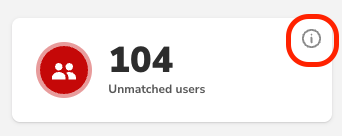
- Check if profile is "Unmatched": To check on the match status for a profile, click on the info icon in the "Unmatched users" tile. This will show a list of all unmatched profiles across both your OS and Strength accounts.
- Trigger "Update Matches" process: Perform a profile match between your OS and Strength accounts by clicking on the "Update matches" button towards top right of screen.
- Make sure the emails match for this member across your OS and Strength accounts
Still not working?
Reach out to us via the "Contact" button at the top right corner of your page or email us directly at support@teambuildr.com with the following information:
- First and Last Name of member/athlete
- Email of member/athlete
While our support team troubleshoots any errors with profile matching, members are able to book on your OS website or via the OS Mobile app
