How do I pro-rate a membership?
 Updated
How do I pro-rate a membership?
OS doesn't have a pro-rating setting. It doesn't calculate a partial first month on its own. You can still pro-rate any membership you sell at the Point of Sale by setting three fields: the two billing dates and a one-time discount.
Members can't pro-rate their own purchases. When a member buys a membership in the app or online, they pay full price and are billed on the day they bought it, every month. There's no account setting that changes this. To pro-rate, sell the membership yourself (see below).
How to pro-rate at the Point of Sale
Example: your studio bills every member on the 1st. A new member joins on Nov 25 on a $35.00/month membership. You want them to pay only for the rest of November, then $35.00 on the 1st from December on.
- Go to Point of Sale, choose the member and add the membership.
- Payment Due Date: leave it as today (Nov 25). This is when the pro-rated amount is charged. With Process Now, it's set to today automatically.
- Membership Starting Date: set it to the 1st of this month (Nov 1). Every charge after the first one is calculated from this date, so the member is billed on the 1st from now on.
- Discount: choose Amount and enter the part of the month the member isn't paying for ($28.00, worked out below).
- Check the Total shows the pro-rated amount ($7.00), then click Checkout.
Pro-rating in Point of Sale example:
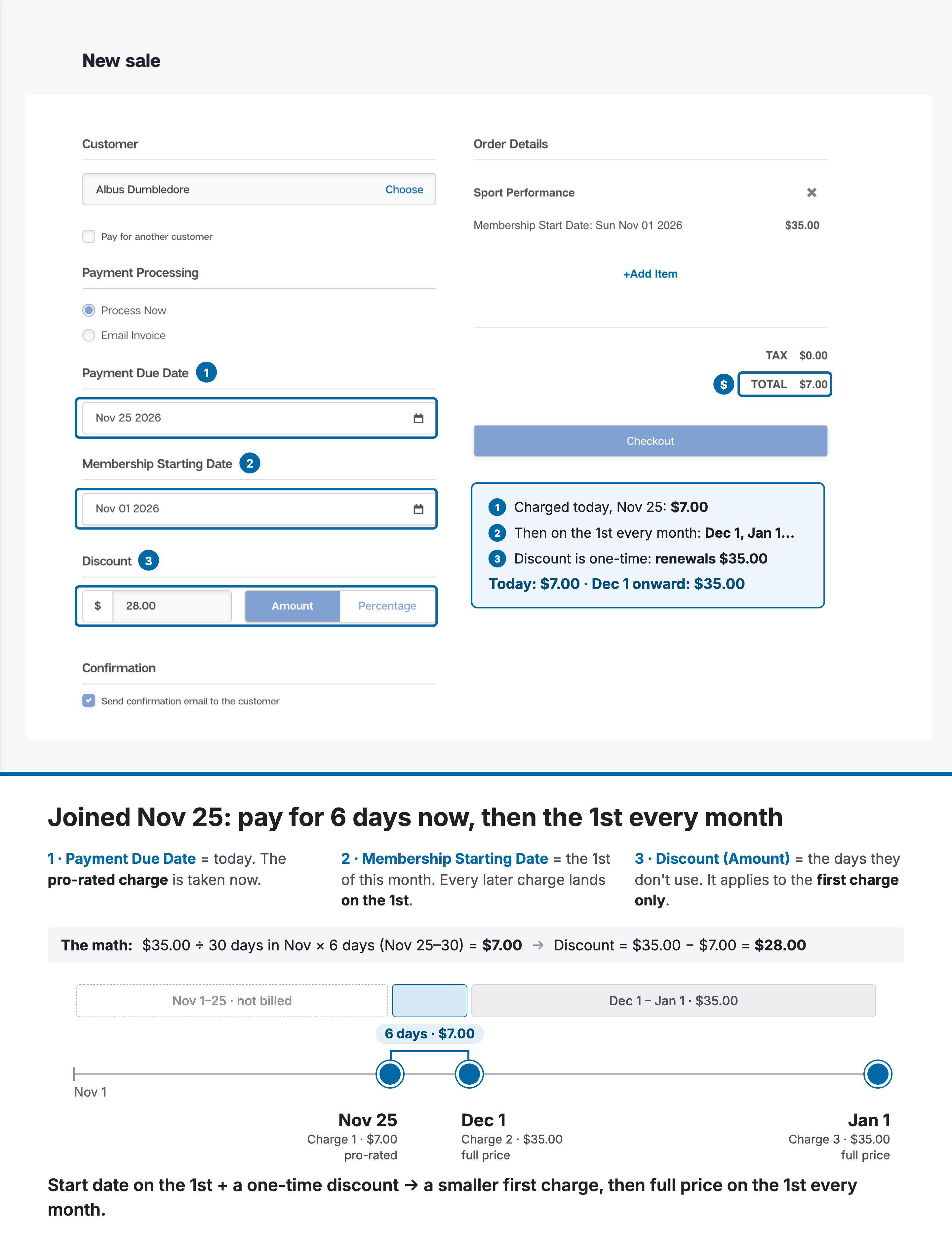
What happens:
Date | Charge |
Nov 25 (today) | $7.00, the pro-rated first month |
Dec 1 | $35.00, full price |
Jan 1, and the 1st of every month after | $35.00 |
The discount only applies to this first sale. Every charge after it is the membership's full price.
Working out the discount
- Daily rate: the monthly price ÷ the number of days in the month. $35.00 ÷ 30 = $1.1667
- Pro-rated amount: daily rate × days left in the month, counting today. Nov 25–30 is 6 days, so $1.1667 × 6 = $7.00
- Discount: the monthly price − the pro-rated amount. $35.00 − $7.00 = $28.00
Prefer a percentage? Use days not used ÷ days in the month. Here that's 24 ÷ 30 = 80%.
Things to know
- The start date must be in the current billing period. Set it to the 1st of this month. A date more than one billing period in the past creates a catch-up charge for every full period since then.
- Use the dates as shown. If the start date and due date are set any other way, the first two charges can land close together. Here that's intentional: the first charge is small. Without the discount, the member would pay full price on Nov 25 and on Dec 1. See What time of day are recurring/scheduled payments charged?
- The discount applies to the whole sale. Sell the membership on its own, or make sure the discount only covers the membership's share if there are other items in the cart.
- A minimum commitment counts from the start date. With a start date of Nov 1, a 3-month minimum runs from Nov 1, not from the day the member joined.
- Class credits aren't pro-rated. If the membership includes a set number of credits per period, the member gets the full amount for this first period.
- Charge in advance still applies. If the membership collects payments a few days early, the next charge is that many days before the 1st.
- Joining on a later date? To pro-rate from a date in the future (say the member starts on Dec 10), choose Email Invoice. Set Payment Due Date to Dec 10, Membership Starting Date to Dec 1, and discount the days before Dec 10. The member pays from the emailed invoice.
Why member purchases can't be pro-rated
When a member buys a membership themselves, OS uses the day they buy it as both the payment date and the start date. They can't choose a start date, and the only discount they can apply is a promotion code. There's no studio setting to turn on pro-rating for these purchases.
Your options:
- Sell it yourself. Use the steps above, in person or over the phone.
- Send them an invoice. Choose Email Invoice at the Point of Sale with the dates and discount above. The member pays the pro-rated amount from the email, and future charges land on the 1st.
- Already bought it? The member is billed on the day they bought it. To move them to the 1st, see How do I change the day a member is billed?
A promotion code isn't a substitute for pro-rating. It gives the same discount whatever day the member joins.
Related
- What time of day are recurring/scheduled payments charged? How the Payment Due Date and Membership Starting Date work, and what time charges run.
- How do I change the day a member is billed?
